

Billing and credits
Plans, credits, what each channel costs, top-ups and plan limits.
Rydhm bills in credits. Every channel (web calls, phone calls, meetings, chat and web search) draws from one balance. One credit is $0.01.
Billing lives in Settings → Billing. Only admins and the owner see it in the sidebar. See Members and roles.
The Billing page tracks your balance and usage whether or not billing is switched on for your workspace. Refusing new calls and enforcing plan limits, as described below, happen only once billing is active. Until then, an empty balance stops nothing, and the page says so: “Nothing is refused yet, because billing isn’t switched on.”
Plans
Each paid plan is a monthly fee. At the start of every month the plan grants the same amount in plan credits. Plan credits expire when the month ends.
“Calls at once” counts the workspace’s live voice calls together: in the app, on the widget and share links, and on the phone.
What things cost
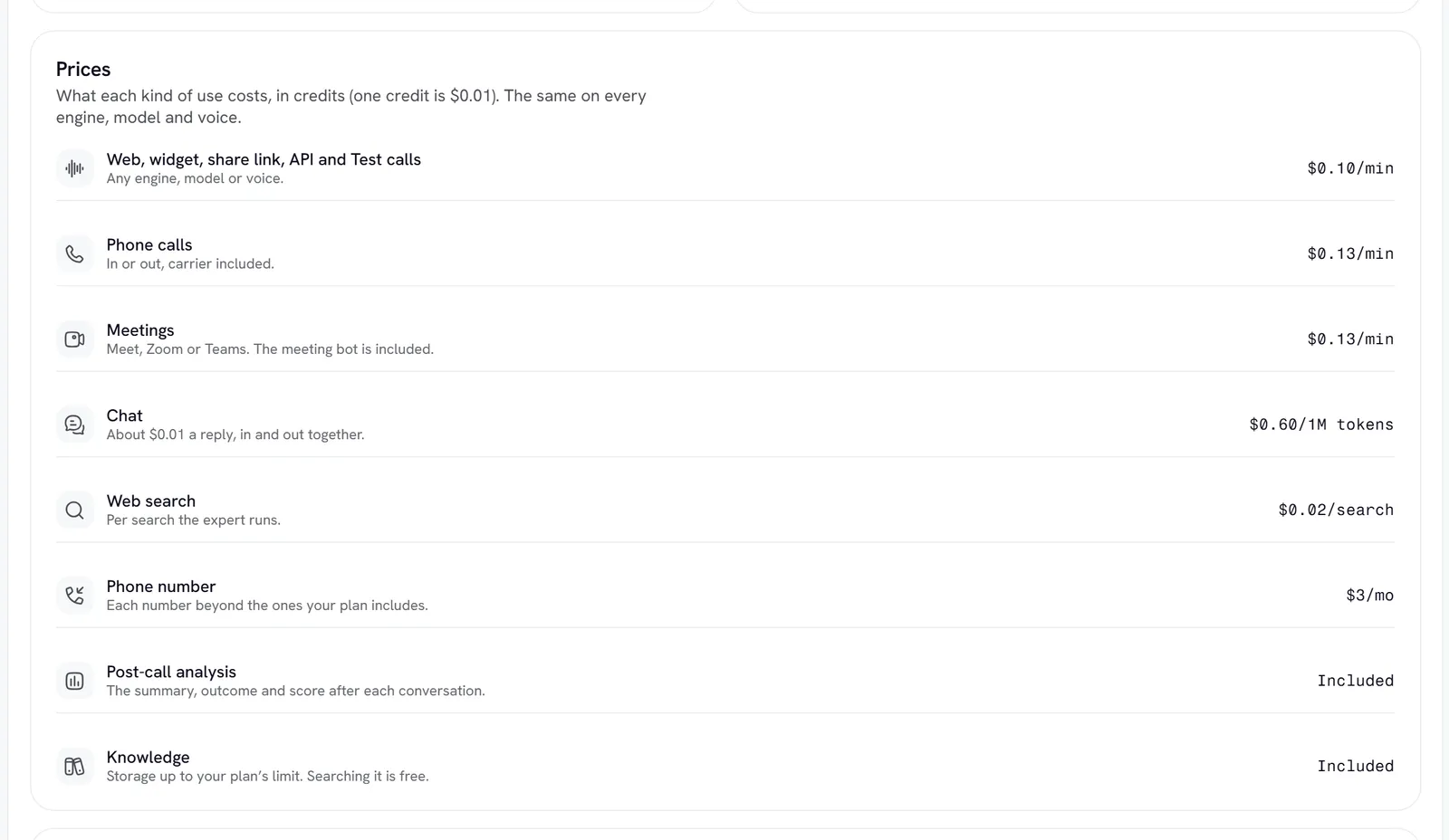
The same rate applies whichever voice engine the expert uses.
A typical chat reply comes to about $0.007. Chat is priced by tokens, not messages, so calls are charged only by the minute and chat is never charged twice. A meeting is charged as meeting minutes only, not as meeting minutes plus voice minutes.
If you bring your own provider keys, these rates don’t change. See Provider keys.
How credits are spent
Usage draws plan credits first, then purchased credits, which never expire. Charges are added up every couple of minutes, so the balance follows your usage closely.
When billing is active, a call, chat or meeting can start only if the balance covers its first minute (one credit for a chat). A running call is never cut, even if it takes the balance below zero. After that, new calls, chats and meetings are refused until you add credits, change plans or the month rolls over. A negative balance is paid back from the next credits that arrive.
The Billing page
Top up
If online payment isn’t set up for your account yet, the button reads Ask for credits and opens an email to Rydhm instead. Rydhm adds plans and credits by hand the same day. After you have bought something, Manage billing opens the billing portal, where you update your card, see invoices and change your subscription.
Low balance
When less than 20 % of this month’s credits are left (grants plus purchases), admins see a banner under the top bar: Credits are running low, with the share left. At zero or below it reads Your workspace is out of credits or Your balance is at zero.
You can hide the banner for the day, except when billing is active and the balance is gone: then it stays until credits are added. The Credits card also shows Running low, with the date the balance runs out at your current pace.
Plan limits
When billing is active, limits are checked when you add something: an expert, a member, a phone number or a knowledge document. Knowledge counts all documents across your experts as one total, so adding a document that would go over is refused: “The Starter plan holds 50 MB of knowledge across your experts. Upgrade for more room.” Phone numbers past the included ones cost $3 a month each, and adding one needs at least $3 in the balance. Each refusal points you to the fix: top up, move to a bigger plan, or contact Rydhm.
Related
- Phone: numbers and call minutes
- Knowledge overview: what counts toward the knowledge limit
- Analytics: usage and cost over time